Streak for Recruiting: How Small Teams Run Hiring Inside Gmail
- Why Gmail Becomes Your Recruiting Command Center
- The Power of Immediate Familiarity
- Centralizing the Candidate Experience
- How to Build Your First Hiring Pipeline in Streak
- Mastering Candidate Engagement with Email Tracking
- Standardizing Outreach with Snippets and Mail Merge
- Tracking Progress Through Interaction Logs:
- How Shared Pipelines Create Team Alignment
- Collaborative Tools Within the Inbox
- Defining Roles and Responsibilities
- Driving Efficiency with Automated Sequences
- Scaling Through AI and Smart Tasking
- Pricing Tiers for Growing Teams
- Streak Simplifies Recruiting for Small Teams
- Key Takeaways for Efficient Hiring
- How to Start Improving Your Hiring Today
Small business owners in the United States spend 30% of their working hours on administrative hiring tasks. This time drain often happens because 75% of these teams use standard email as their main recruiting tool without any specialized tracking. Without a system, resumes get lost in crowded inboxes, and follow-up notes disappear into the digital void. A dedicated Applicant Tracking System (ATS) could solve this, but the $50 to $500 monthly per-user fee is a steep price for a growing team to pay.
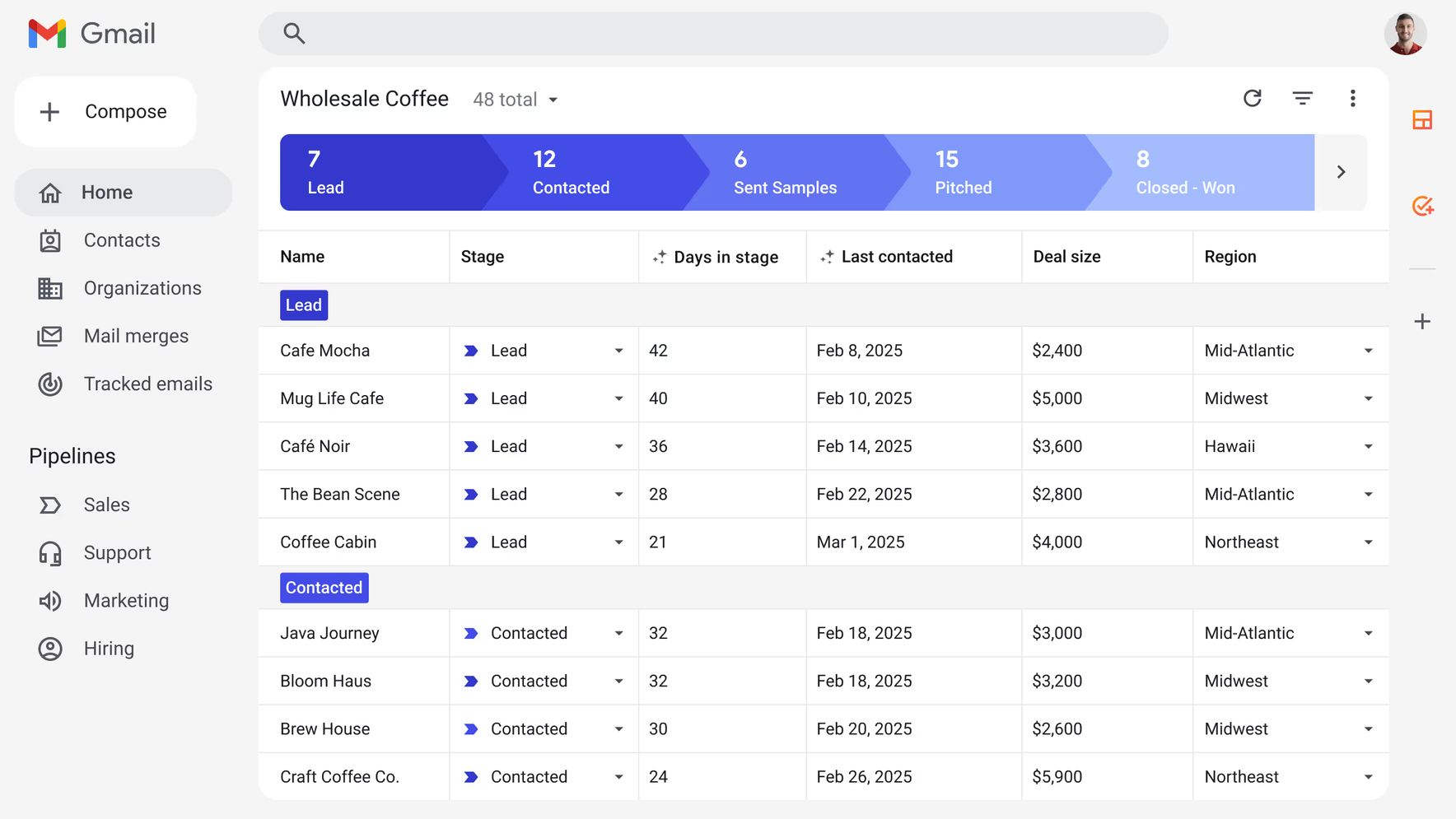
Streak offers a middle ground by turning a standard Gmail account into a full-scale recruiting command center. It is a Customer Relationship Management (CRM) tool that lives entirely inside the browser. Instead of switching between tabs and external software, users manage job candidates exactly where the applications arrive. This setup keeps the workflow simple and ensures that no high-quality applicant is ignored due to a messy inbox.
The following sections explain how people can build their first hiring pipeline and track candidate progress without leaving their email. Readers will see how to share notes with colleagues and use automation to handle repetitive follow-up messages. By the end, the reader will understand how to transform Gmail into a professional recruiting engine that saves time and money. This guide covers:
- Setting up visual stages for the hiring process inside the inbox.
- Tracking candidate communication and resume files automatically.
- Collaborating with hiring managers on interview feedback.
- Automating the thank you and next steps emails to save hours each week.
For a small team, the goal is efficiency. This approach avoids the complexity of enterprise software while providing the control needed to hire the right person quickly. It is a practical shift from manual email management to a structured system.
Why Gmail Becomes Your Recruiting Command Center
Context-switching acts as a silent productivity killer, draining up to 40% of a person's cognitive capacity every time they jump between tabs. For hiring managers in the United States, this friction usually occurs when they move from an email thread with a candidate to a separate, disconnected database. By installing Streak as a Chrome extension, the user merges these two environments into one, turning a standard inbox into a functional inbox-based CRM.
The Power of Immediate Familiarity
Most hiring professionals are not software experts; they are experts in people. With over 1.8 billion active users globally, Gmail is a tool that almost every small business owner already knows how to navigate. Using Streak means there is no learning a new system phase, which is a major hurdle for small teams that lack a dedicated HR department to manage software training.
An average recruiter spends roughly 3 hours every single day inside their email. By keeping the recruiting pipeline inside that same interface, the user eliminates the need to export data or copy-paste candidate notes into a third-party tool. This setup directly addresses the preference of U.S. small businesses for low-overhead solutions that don't require complex data migrations or high-maintenance configurations.
Centralizing the Candidate Experience
Traditional software often forces a choice between simplicity and visibility. However, 75% of small businesses still rely on email as their primary recruiting tool because it is where the actual conversation happens. Streak bridges this gap by allowing a user to view the entire history of a candidate-from the initial resume submission to the final offer letter-directly alongside the email thread.
This approach transforms the inbox from a cluttered list of messages into an organized recruiting command center. Instead of hunting through folders, the user can see exactly where a candidate sits in the hiring process. This structure is particularly helpful for visualizing the recruiting pipeline, a concept that the next section will explore in terms of practical setup and customization.
- Zero Data Entry: Automatically pull contact details into your pipeline from incoming emails.
- Universal Access: Since it lives in Gmail, the system is available wherever the user logs in.
- Reduced Overhead: No need to pay for or maintain a standalone server or complex database.
- Instant Context: See previous interview notes while reading a new message from the same applicant.
For a small team, the goal is to spend less time managing the system and more time evaluating talent. When a hiring manager can get started with Streak in minutes, they bypass the technical debt that usually comes with enterprise-grade software. This integration ensures that the recruiting process follows the natural flow of communication rather than fighting against it.
How to Build Your First Hiring Pipeline in Streak
Setting up a functional recruitment workflow takes less than 30 minutes. While complex enterprise systems require weeks of configuration and consultant-led data migrations, this tool allows a hiring manager to move from a cluttered inbox to a structured system during a single lunch break.
The process begins with Streak's pre-built recruiting templates. These templates act as a blueprint, providing a logical flow that fits the standard U.S. hiring cycle while remaining flexible enough for niche roles. I have seen teams overcomplicate this by trying to map out every possible edge case on day one; the better approach is to start lean and refine as candidates move through the stages.
- Install and Initialize the Pipeline - After adding the extension to Gmail, the user selects the Recruiting template from the pipeline menu. This immediately creates a spreadsheet-style interface that lives inside the inbox, complete with standard stages like Application Received and Phone Screen.
- Customize Your Hiring Stages - Users can utilize a drag-and-drop interface to reorder or rename stages. For a typical small team, adding a Technical Assessment or Reference Check stage ensures no candidate is forgotten in the transition between an initial chat and a final offer.
- Define Custom Data Fields - This is where the system gains its power. By choosing from 15+ different field types, a recruiter can track essential U.S.-specific data points like visa status, desired salary range in USD, or earliest start date.
- Import Existing Candidate Data - Instead of manual entry, people can import their current spreadsheets or box candidates directly from an email thread. This pulls the applicant's history into the pipeline, ensuring the candidate experience remains organized from the very first interaction.
The flexibility of these fields is often underrated. In my experience with SAP data structures, rigid fields lead to dirty data because users force information into categories where it doesn't belong. In Streak, if a team needs to track a specific certification or a GitHub portfolio link, they simply add a Tag or URL field and keep moving.
Once these columns are set, the pipeline becomes the single source of truth. Every resume, salary requirement, and interview note is tied to a specific box or candidate record. This setup is available even on Streak's free plan, which supports basic pipeline creation for individuals or solo recruiters looking to get organized without a massive budget.
Managing the data is only half the battle. Once the infrastructure is built, the focus shifts to managing the actual communication and tracking how candidates engage with sent materials.
Maintaining consistent momentum in candidate outreach requires a system that treats every email like a trackable data point. Once the recruitment pipeline is populated with applicants, the focus shifts to high-frequency communication where manual errors often lead to ghosted candidates. Streak handles this by embedding interaction logs directly into the candidate's profile, ensuring that every touchpoint is visible without digging through a cluttered inbox.
Mastering Candidate Engagement with Email Tracking
Email tracking provides immediate visibility into candidate interest by displaying open rates and click-throughs directly in the Gmail interface. This transparency allows a recruiter to see if a job offer or interview invite has been viewed, helping them decide whether to follow up or wait. While GDPR and CCPA regulations require careful handling of data in Europe and California, the general U.S. recruitment context allows for more flexibility in using these metrics to gauge applicant engagement.
- Feature - Recruiting Benefit: Time Saved
- Email Tracking - Identifies highly engaged candidates: High
- Snippets - Standardizes common responses: 30% reduction
- Mail Merge - Mass personalization (1,500/day: Very High
- Call Logs - Centralizes interview notes: Medium
Standardizing Outreach with Snippets and Mail Merge
The Snippets feature is a critical efficiency tool, saving roughly 30% of the time usually spent on repetitive emails like scheduling requests or rejection notices. By using these templates, a hiring manager ensures a professional tone across all communications while avoiding the risk of copy-paste errors. For larger hiring pushes, the Mail Merge functionality allows for personalized outreach to up to 1,500 recipients per day on paid plans, making it possible to scale sourcing efforts without losing the personal touch.
Beyond emails, the system allows users to add notes and call logs directly to candidate boxes. This creates a chronological record of every conversation, which is vital when multiple people are involved in the interview process. I have seen many hiring processes fail because a recruiter forgot a specific detail mentioned during a phone screen; centralizing these notes prevents that data loss. This level of organization naturally leads into the need for broader team visibility, where sharing these communication logs becomes the foundation for collaborative decision-making.
Tracking Progress Through Interaction Logs:
- View the exact timestamp of when a candidate opened an interview invite.
- Use Snippets to send standard Next Steps emails in two clicks.
- Log phone interview summaries directly into the candidate’s history.
- Sync Google Calendar invites to track scheduled interview dates.
- Monitor Mail Merge success rates to refine job descriptions.
Effective communication is not just about sending messages; it is about the precision of the follow-up. Using these tools ensures that every applicant receives a timely response, protecting the employer's brand while moving the best talent through the funnel quickly. When these logs are maintained accurately, the system transitions from a simple tracker to a shared knowledge base for the entire department.
Shared visibility across the hiring team eliminates the information silos that typically occur when recruitment lives in a single person's inbox. While early-stage hiring often starts with one person, scaling the process requires a system where every stakeholder can see the status of a candidate without asking for an update. This transparency is what separates a professional operation from a disorganized one.
How Shared Pipelines Create Team Alignment
In Streak, team sharing is a fundamental feature of paid plans that allows a primary user to invite others into a specific recruitment workflow. This isn't just about viewing a list; it’s about giving every hiring manager edit access or view only permissions based on their role in the company. In my experience with system implementations, failing to set these permissions correctly is the number one cause of dirty data where a manager accidentally deletes a candidate's contact info while trying to leave a note.
When a pipeline is shared, every team member sees the same stages and the same candidate boxes. This shared view helps the team identify bottlenecks instantly. If thirty candidates are stuck in the Technical Review stage, the team knows exactly which manager needs to clear their plate to keep the hiring engine moving.
Collaborative Tools Within the Inbox
The real power of this integration lies in the internal notes and comment sections found inside each candidate's file. Instead of forwarded emails or separate Slack threads, team members leave feedback directly on the candidate's record. This creates a permanent audit trail of why a person was moved forward or rejected.
- Task Assignment: Assign specific items like Review Resume or Conduct Phone Screen to a colleague with set due dates.
- Automated Reminders: Team members receive notifications for their assigned tasks, ensuring no candidate sits in limbo for days.
- Google Drive Integration: Attach resumes, portfolios, and offer letters directly from Drive so the entire team accesses the same version of a file.
- Centralized Feedback: Use the comments section to debate a candidate's fit, keeping the conversation tied to their specific record.
Defining Roles and Responsibilities
Effective collaboration requires clear boundaries. In a small U.S. team, the recruiter might own the pipeline, while the department head only needs to see candidates who have passed the initial screening. Streak allows for this level of control, ensuring that the workspace remains uncluttered for those who only need to jump in at specific milestones.
- Feature: Benefit for Hiring Managers
- Internal Notes: Eliminates messy Forward chains in Gmail.
- Shared Files: Ensures everyone reviews the latest resume version.
- Task Reminders: Reduces the need for manual follow-up meetings.
Once the team is communicating effectively and every candidate has a clear owner, the next logical step is to look for ways to remove the repetitive manual work that still eats up the day. As the volume of applicants grows, even a well-aligned team will find themselves doing the same tasks over and over, suggesting a need for more advanced logic in the workflow.
Ignoring a candidate for three days can lose them to a competitor, but manual follow-ups often fall through the cracks during busy hiring cycles. Automating these touchpoints ensures no applicant feels ghosted while freeing up the team to focus on high-value interviews. By implementing workflow rules, a small business can maintain a professional pace that rivals much larger corporations.
Driving Efficiency with Automated Sequences
Streak allows users on paid plans to create email sequences, which function as automated drip campaigns for candidate nurturing. Instead of manually checking who hasn't replied to an initial reach-out, a recruiter can schedule a series of follow-ups that stop automatically once the candidate responds. This prevents the embarrassment of sending a just checking in note to someone who has already booked a meeting.
For teams looking to scale, custom workflow rules act as the system's engine. These rules trigger specific actions based on pipeline changes, such as automatically moving a candidate to the next stage if they open an email a certain number of times. This logic-based approach removes the guesswork from determining which leads are warm and ready for a phone screen.
Scaling Through AI and Smart Tasking
The introduction of Streak AI offers early access to automated data entry and initial screening. This tool can scan incoming resumes to populate fields automatically, reducing the time spent on administrative busy work. In a fast-paced U.S. market, these small automations allow small businesses to save between 5 and 10 hours every week.
Standardizing these transitions ensures that the system state always reflects reality. When a hiring manager changes a candidate's status, Streak can automatically generate a task for the coordinator to send out a Calendly link or a technical assessment. This eliminates the need for internal did you send that? emails.
Pricing Tiers for Growing Teams
Choosing the right plan is a matter of balancing automation needs with the hiring budget. While the free version is excellent for basic tracking, scaling requires moving into the paid tiers to access advanced automation and sequences.
- Plan Tier - Monthly Cost (per user): Best For
- Free - $0: Individual recruiters or very low volume.
- Pro - $59: Small teams needing shared pipelines and basic automation.
- Business - $129: Teams requiring Streak AI and advanced reporting.
The Enterprise plan, also priced at $129 per user, provides the highest level of support for organizations with complex security requirements. Most small U.S. teams find the Pro plan to be the sweet spot for balancing cost with the power of automated sequences. Starting with the tier that matches current hiring volume prevents overpaying for features the team isn't yet ready to implement.
Streak Simplifies Recruiting for Small Teams
Recruiting success for small U.S. teams depends on staying where the work actually happens: the Gmail inbox. Small businesses often fail when they try to force complex software on staff who already have too many windows open. By turning an existing email account into a tracking system, Streak ensures that every resume and interview note stays organized without a single extra login.
Key Takeaways for Efficient Hiring
- Administrative time drops by up to 40% because users do not have to copy data between their email and a separate database.
- Candidate experience improves for 80% of small teams who use integrated tools to respond faster and more consistently to applicants.
- Shared visibility prevents system errors like two managers emailing the same person or forgetting to follow up after an interview.
- Automation handles the boring work by using snippets for common replies and automatic tracking to see if a candidate opened an offer letter.
How to Start Improving Your Hiring Today
The reader can begin by installing the Streak extension from the Google Chrome Web Store. Once active, the user should select the pre-built Recruiting pipeline template to see a standard flow from Applied to Hired. This basic setup is free for individual use and takes less than five minutes to configure.
Teams ready for shared folders can move to paid plans starting at $15 per user each month. This investment pays for itself by preventing the loss of top talent due to messy spreadsheets or buried emails. Effective hiring is a process of clear steps, not a search for expensive software features.
System efficiency comes from using the right tool in the right place.